![LumenLearning_StackedLogo_RGB_Blackboard@2x.png]](https://support.lumenlearning.com/hs-fs/hubfs/Branding%202023/LumenLearning_StackedLogo_RGB_Blackboard@2x.png?height=40&name=LumenLearning_StackedLogo_RGB_Blackboard@2x.png)
This article addresses the technical requirements for Lumen Courseware, initial troubleshooting and how to get help.
What Are the Technical Requirements?
Desktop Browser Support
Lumen courseware is supported on the most recent versions of the following desktop browsers:
- Google Chrome (Note: Chrome incognito mode is not recommended)
- Safari
- Mozilla Firefox
- Microsoft Edge
Mobile Browser Support
The following mobile browsers are supported on common iOS and Android devices:
- Android
- Google Chrome
- Mozilla Firefox
- Microsoft Edge
- iOS
- Safari
- Google Chrome
- Mozilla Firefox
Browser and Cookies
If you experience any issues on a supported browser, please make sure you are on the latest browser version. You can check at: http://www.whatsmybrowser.org/Step 1: Allow Cookies and Cross-site tracking Google Chrome:
Allow Cookies
![]()
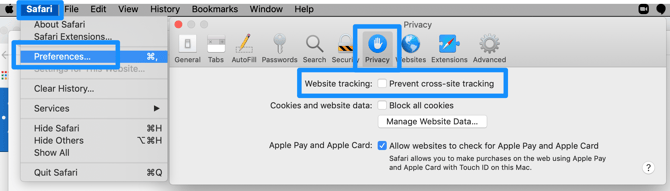 iPad or iPhone: Navigate to Settings and scroll down to Safari. Click the slider to disable so that cross site tracking is no longer prevented.
![]()

- You will need to adjust your settings to "Allow Cookies." You can find instructions on this page to allow cookies.
- You will need to adjust your settings to "Allow Cookies and Tracking." You can find instructions on this page to allow cookies.
- Click on the More actions button on the toolbar, and select Settings.
- Search for View advanced settings and click on it.
- Under Cookies section, select Don't block cookies (default).
- Restart Edge.
iPad or iPhone: Navigate to Settings and scroll down to Safari. Click the slider to disable so that cross site tracking is no longer prevented. Step 2: Clear your cache and cookies
Step 3: Try a different browser or device
- Clear cache and cookies in Chrome
- Clear cache and cookies in Firefox
- Clear cache and cookies in Safari
Step 3: Try a different browser or device
- We recommend accessing your Lumen course by signing in directly to your campus LMS portal; Lumen courses are not supported when accessing via LMS apps.
- If you discover issues on any of the supported browsers or devices listed above, please report them to us by submitting a ticket so that we can investigate and continue to improve the Lumen One experience.
If managing your Cache and Cookies, as well as trying a different browser does not work, you can contact the Lumen Support team by submitting a support request.
- a screenshot of your browser showing the error message or what happened on the screen when you encountered the issue
- a description of the issue
- the time you encountered it
- the details about your browser that you can find here: http://www.whatsmybrowser.org/
We're happy to help!